Have you just picked up a new Five SIM in the UAE and can’t remember your number? Whether you’re a tourist, expat, or resident, knowing your mobile number is essential for recharges, registrations, and everyday communication. In this guide, we’ll show you how to check your Five SIM number using multiple hassle-free methods—no tech skills required.
What Is Five SIM UAE?
Five Mobile is a mobile virtual network operator (MVNO) powered by Etisalat, one of the largest telecom providers in the UAE. It offers prepaid mobile services through digital platforms, known for affordability and flexibility.
However, new users often find it confusing to retrieve their phone number once the SIM is inserted—especially on basic phones. Don’t worry; here are all the updated and verified ways to find your Five SIM number in 2025.
Method 1: Five SIM Number Check Code USSD
The fastest and most reliable method is through a USSD code. Here’s how:
- Open the dialer on your phone.
- Dial
*101#and press call.

- From the menu, select “Account Management” by replying with
1. - Then reply with
3for “Account Information.” - Finally, choose the option “Know My Number”—usually by replying with
3.
Your number will be instantly displayed on your screen.
Pro Tip: If the menu options have changed, just explore the sections logically—they usually follow the same sequence.
Method 2: Call the Five Mobile Helpline
You can also call the Five Mobile support number:
- Dial
121from your Five SIM. - Speak to a customer service agent.
- Provide any required details (e.g., Emirates ID or SIM pack info).
- The agent will share your mobile number.
Note: This method requires active balance on your SIM card.
Method 3: SMS ‘MYNUM’ to 1010
This is a simple and effective method that works well on basic phones:
- Open your Messages app.
- Type
MYNUM(in all caps). - Send the message to
1010.
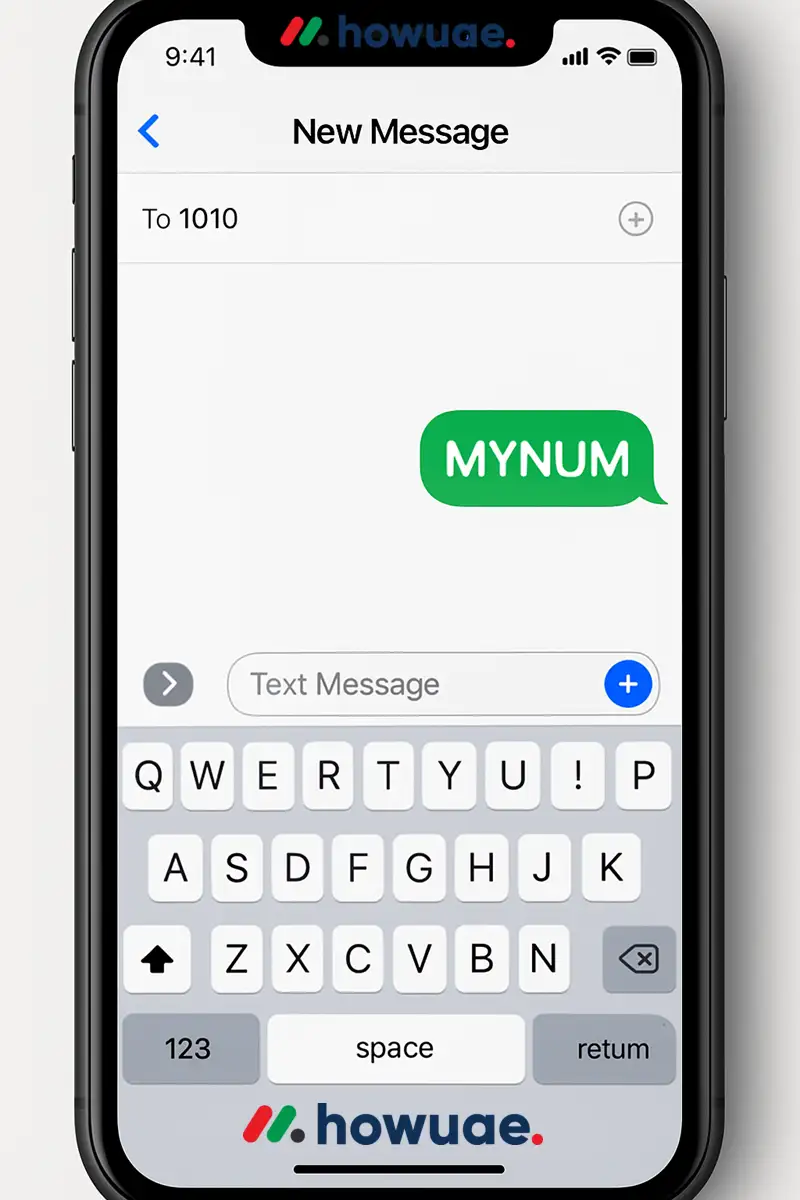
You’ll receive an SMS shortly with your active Five SIM number.
Method 4: Call Another Phone
The old-fashioned way still works!
- Use your Five SIM to call or send a message to another phone (friend, relative, etc.).
- Check the caller ID or SMS details on that phone.
- That’s your Five number.
This method requires available credit or an active mobile plan.
Method 5: Use the Etisalat or Five App
Since Five is powered by Etisalat, your number can be found through these official apps:
Option A: Etisalat App
- Download the My Etisalat UAE app from the App Store or Google Play.
- Log in with your account.
- Your mobile number will be shown on the dashboard.
Option B: Five Mobile App
- Download the Five App from your app store.
- Sign in using your SIM credentials or email.
- Navigate to “Account” or “My Profile” to see your number.
This method requires mobile data or Wi-Fi access.
Other Options to Check Your Number
✔️ Check SIM Card Packaging
- When you purchased your Five SIM, your mobile number was printed on the package.
- Look for a sticker or printed card inside the kit.
✔️ Visit the Five UAE Website or Store
- You can visit https://five.ae and chat with customer support.
- Alternatively, visit a Five service center with your Emirates ID.
Related: Du vs Etisalat UAE| Etisalat Umrah Package| Etisalat International Call Offer 9 Fils|
Summary Table: How to Check Five SIM Number
| Method | Description | Requires Balance? |
|---|---|---|
| USSD Code (*101#) | Menu-based code to display number | No |
| Call 121 | Talk to customer support | Yes |
| SMS “MYNUM” to 1010 | Auto-reply with your number | No |
| Call Another Phone | See number from caller ID | Yes |
| Etisalat / Five App | View number in app account | No |
| SIM Card Pack | Printed on original packaging | No |
Final Thoughts
Five SIM Number Check is quick and simple—whether you’re using a smartphone or basic keypad device. From USSD codes to SMS and app solutions, this guide has covered every reliable way to retrieve your number in the UAE.
Stay connected and keep your number safe. If you still face issues, the Five support team is just a call or tap away.
Read: Etisalat 53 GB Free Data | How to Check Etisalat Number UAE| Etisalat 1GB Per Day For 30 Days
FAQ: Five SIM Number Check
Q1: Is 101# the same for all Five users in the UAE?
Yes, *101# is the standard USSD code for all Five SIM users.
Q2: Does the SMS method work without balance?
Yes, sending MYNUM to 1010 is free of charge.
Q3: What if none of the methods work?
Call Five support at 800 544 or 166, or visit their official website for live help.
Q4: Can I use these methods outside the UAE?
USSD and SMS methods may not work if you’re roaming. Use the Five app with Wi-Fi instead.